
Within a complex network of ductwork, HVAC equipment, electrical components, and plumbing systems things are bound to conflict. Want everything to fit perfectly? BIM for MEP engineering is what will help you. Following MEP best practices supports MEP engineers create MEP designs that are impeccable and error-free. BIM for MEP engineering makes the flow simple and saves valuable hours.
Table of Contents
Without Mechanical, Electrical, and Plumbing systems, buildings are inoperative and uninhabitable. We need modern MEP engineering processes and tools in place to realize optimum building performance. Only BIM has the capacity to bring numerous people, systems, and software to work together. For example, Revit is one of the key tools to build 3D models in BIM and it can be integrated in workflows that have other tools. If you are an MEP consulting firm still operating with 2D drawings, you know that it’s hard to avoid frequent changes, onsite arguments, material waste, delays, and rising costs, and it is time to adopt BIM.
The use of BIM for MEP engineering is important, and as an MEP modeler or engineer, you have to adopt MEP best practices. For that purpose, here we have explained a series of best practices that you should utilize. We begin with MEP BIM coordination as the starting point.
BIM gives us a significant advantage with 3D models and interdisciplinary coordination, and that’s just the start. As we start converting drawings, photos, or sketches into a federated BIM model with the required LOD, all the pieces start falling in place. Architects design floors, walls, and spaces. Structural teams enrich the architectural model with beams, columns, and slabs.
Once that is set, MEP specialists add ductwork, cables, pipes, and other MEP components. Every model is combined to form a single coordinated entity. As it is a single source of visualization and data, everything stays in one place. Every bit and piece in the 3D model is aligned to fit and work with each other to obtain the benefits of BIM for MEP coordination. That is BIM coordination in simple terms.
The next step is Clash detection in MEP BIM.
Without conflict detection, all the preliminary work in building design would just be a waste. As an MEP engineer, you don’t want ducts running into beams or pipes crashing into cable trays. It’s not just the clashes, but clearances that need to be set. Maintenance engineers would not be able to perform work if HVAC ducts blocked maintenance panels.
So what does clash detection in MEP BIM do? It makes the entire system conflict free to run smoothly from when construction begins to when it finishes. Wondering how clashes are identified and removed? Tools like Navisworks are used globally by BIM professionals to trash out clashes in the early design phase. Navisworks categorizes clashes as hard, soft, and workflow so that they are understood and the right people are selected to resolve them.
Okay, so we have a basic understanding of the how’s and why’s of BIM for MEP engineering. We move forward with the 10 best practices that make you a Revit pro and use other tools as well.
Optimize your MEP BIM workflow with expert clash detection and coordination support.
Connect with our BIM specialists »Anyone who learns BIM tools like Revit and Navisworks can create a 3D model – simple. But, are you extracting the maximum capacity of these tools? Maybe or may be not! This is the exact reason why this article is written, to remove this confusion and be accurate from the start. Let’s start with the first best practice and we will continue to understand others as we move along.
BIM Execution Plan or BEP is the starting point; it all starts here. Set the ground rules at this point to understand the larger picture. Start with who are the people, what would each one do, and at what stage. At this level, you can even understand how information moves between numerous people.
Staying aligned with everything, and everyone on the project is essential. There is a list of things that can be incorporated in the BEP. For example, project scope, team roles, modeling standards, Level of Detail (LOD), coordination, etc. Once this information set is locked and ready, you can move to the next step.
Everybody goes through basic BIM training; that is not enough. Once the right individuals are selected, it’s important you provide required training to upgrade their skills. Using tools like Revit, Navisworks, AutoCAD, and BIM 360 require a degree of learning. Why? Because they are interconnected and compatible to make work easy.
Provide the following training modules to make them ready for BIM projects.
Next in line is improving project control using Navisworks.
As we have discussed earlier, there are numerous tools that are used to get a project to fruition. This means the content within them needs to be accurate and interoperable. Making information within the model, clear and aligned makes coordination more prudent. It also reduces errors and silos in the project.
This interoperability comes from various directions including automation like Dynamo and Scripts. Including Revit families and parametric modeling also requires a strong foundation for interoperability. When all the boxes checked, we get documentation that is free of conflicts.
Adopt a strong quality control process to check every aspect of the project. Do not neglect quality control as it can lead to inaccuracy, inconsistency, and reliability issues. It can also impact the final outcomes of construction. What can you do to adopt quality control?
Continuous reviews of the 3D model, version control, and categorized documentation are a part of quality control. Taking it further, you can enrich the model with industry standards like SMACNA and ASHRAE to improve MEP system performance.
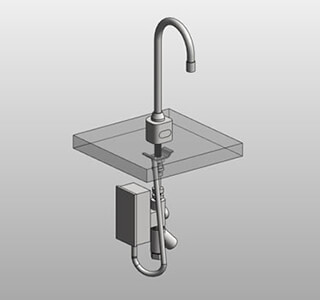
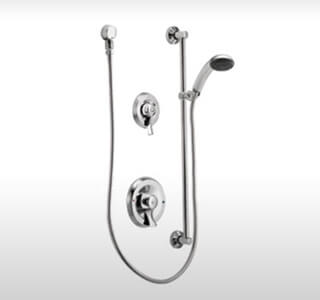
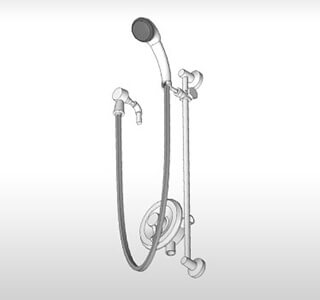
An immersive experience for clients can be done with walkthroughs and renders in 3Ds Max. But, before that, we need to use Revit families in the 3D model. Revit families contain objects in architecture, structure, and MEPF that are geometrically accurate and built for realism with actual material types.
Content creation in Revit BIM helps manufacturing teams with performance analysis and precise fabrication. When all the MEP components work together, onsite installation becomes faster and error-free for teams on the site.
Creating Revit families for a plumbing manufacturer in the US leads to faster modeling
A commercial plumbing manufacturer from the US wanted to create Revit families. They outsourced this work to Hitech CADD Services. We were given PDF files as the preliminary input. Analyzing the files, the team began its work to create Revit families in Revit. 150 families were created with multiple properties and sizes.
After we handed over the deliverables, the client was able to:
 Revit Family Creation MEP Equipment
 Revit Family Creation MEP Equipment
 BIM Content Creation for Plumbing Equipment
When you are working on complex and large-scale projects, cost and time are invaluable. If you are not considering these parameters in the early stages, then it would negatively impact the project. A 3D model can help you with visualization, but if connected with time and cost provide a comprehensive snapshot.
Extending the capabilities of a 3D model is done with 4D and 5D BIM. 4D BIM driven by schedule simulations help teams visualize every stage. You can see at what time of the project would a crane arrive at the site or materials be relocated. You can also see when each component like pipes, ducts, or equipment is constructed and sent on the work site. Simply, it converts static 3D models into a visual project timeline.
4D BIM model for a mixed-use building in the UK reduces costs
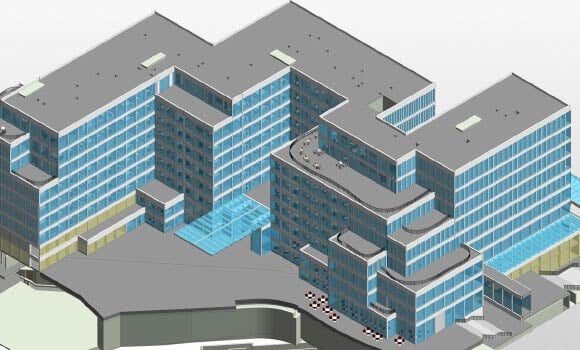
An architectural company from the UK partnered with Hitech CADD Services for multistory project. We were given 2D drawings to create a coordinated and conflict free 4D model. A construction sequencing video was also needed.
Our team at Hitech CADD Services used tools like Revit, Navisworks, and 3Ds Max to create a clash free 4D model along with a TimeLiner video.
After we handed over the deliverables, the client was able to:
 Architectural BIM Model
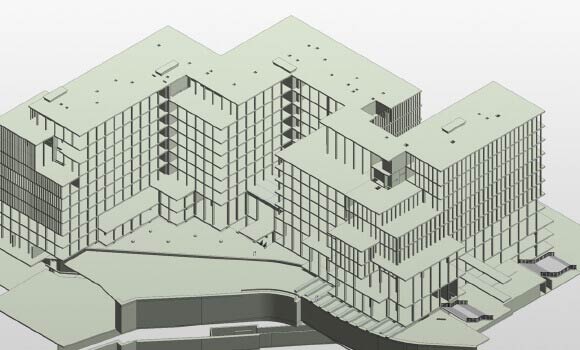 Structural BIM Model
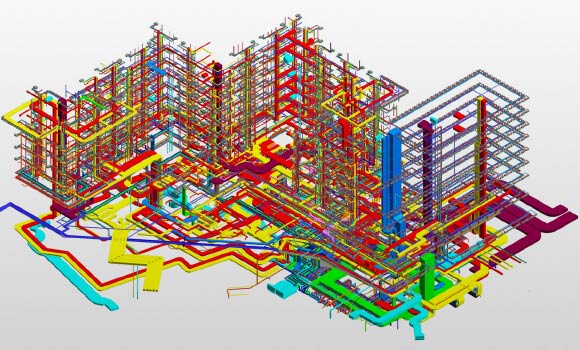 MEP BIM Model
BIM heavily relies on collaboration between people at a very early stage. When every team communicates on an updated 3D model, it speeds up all the processes. But, how does one collaborate with others using the 3D model?
It’s simple, BIM 360 is used globally to store, share, and edit the 3D model in real-time. When all the pieces of the project are assembled and stored here, it enables quick problem resolution. Furthermore, it provides better oversight through audit trails. This ensures refinement at every stage which leads to a complete construction ready 3D model.
This is one practice that helps facilities managers and renovation teams ensure asset management. We have already discussed how the 3D model stores every piece of information on assets. This data points to installation, maintenance timelines, part numbers, warranty data, etc.
When this data is easily available to facilities management or renovation experts it lowers the downtime to flag problems. While doing so, it can also minimize the cost of repairs. Another aspect of using this data includes sustainability and efficiency in BIM MEP.
What this means is MEP specialists need to review and refine templates and rules. As tools change, project needs also tend to go in another direction. We need to get them in a positive direction with updated standards.
Models stay consistent and error-free. You can even improve coordination and add clarity in data for efficient handovers. All these lead to time savings and lower confusion on the site.
We have observed 10 best practices above, now we shall understand their support in MEP projects.
| Aligns teams: |
|
|---|---|
| Trims down time and costs: |
|
| Puts quality at the forefront: |
|
AI and Machine Learning (ML) will change how engineers perceive MEP design. It would help MEP specialists calculate the best possible routes between cables, ducts, and pipes. Clash detection would become stronger and faster ensuring minimal rework. On the other hand Machine Learning (ML) learns from past projects create prototypes.
It would be able to predict the location of issues before construction begins. Using AI and ML tools would be helpful in testing and optimizing energy efficiency. 3D models would continue to exhibit smart behavior as information is included over a period of time. As a member of the team you would be able to make quick calls. While it will not replace MEP engineers, it will simplify their work and add a layer of accuracy and reliability.

MEP BIM Models with Machine Learning
Explore the transformative impact of machine learning on MEP BIM models in our comprehensive white paper. Discover how integrating advanced algorithms enhances design accuracy, optimizes system performance, and streamlines workflows in MEP engineering. Gain insights into innovative strategies that can elevate your projects and drive efficiency.
Download the Whitepaper NowWhile we reach the closure of this article, it is important to learn how these best practices will impact the reliability, quality, and efficiency of a project. BIM for MEP engineering will continue to serve you well, but it needs the right direction. As we march into the future, greater numbers of tools will extend the capacity of BIM by integrating with software like Revit, Navisworks, etc. Teams will be able to ensure lasting success while they latch onto new tech and changing industry standards.

Bhavesh Umraniya is a BIM MEP expert with over 10 years of experience in the mechanical BIM field. Having, worked on multiple MEP projects worldwide, he is always looking for ways to enhance design quality and project productivity through technology interventions and process excellence. His exposure to various residential and commercial sectors, including hotels, airports etc. makes him a go-to authority in the BIM MEP space.
You may also like
The Role of Millwork Detailing in Modern Architecture
 Feb 11th, 2026