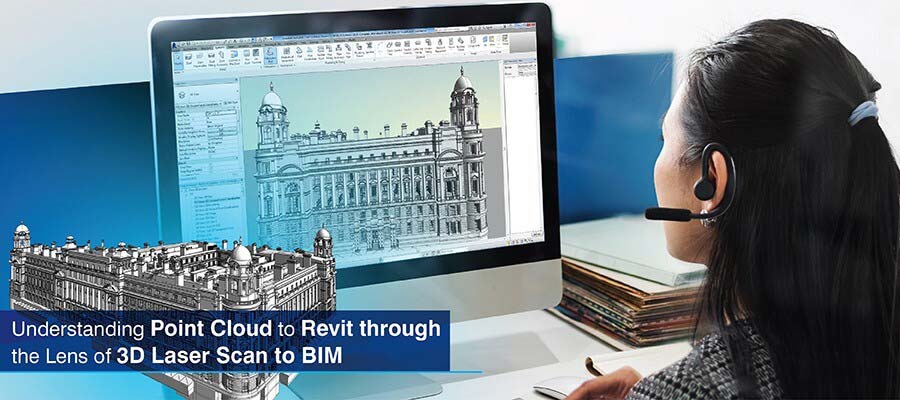
3D laser Scan to BIM is essential for laser scanning firms as it documents as-built conditions with high precision. Surveyors can leverage a point cloud to Revit model to reduce rework and errors with clash-free 3D modeling for various renovation as well as retrofit projects.
Table of Contents
As assets age, there is a constant need for them to be renovated under regulatory requirements. This is where as-built documentation helps. Surveyors and surveying companies can use 3D point cloud to BIM modeling to develop accurate and complete digital records for retrofit planning, analysis, BIM integration, and risk prevention.
Most cases of incomplete data and inaccuracies in projects happen from human errors, which are inevitable when using legacy methods, outdated 2D drawings and manual measurements. These methods are time-consuming, disrupt operations, fail to capture hidden components and compromise safety.
Proper as-built modeling includes data-rich 3D BIM models, which you build from high-resolution point cloud scans using tools like Revit. These models provide geometric accuracy, 3D model validation, conflict resolution and accurate deviation analysis. As a surveyor, you can use interoperable BIM deliverables for quick and advanced renovation and asset management with customized scan to BIM services.
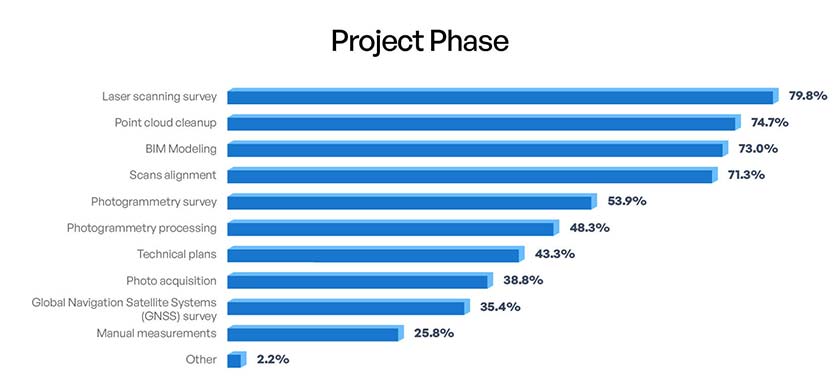 Source: mdpi.com
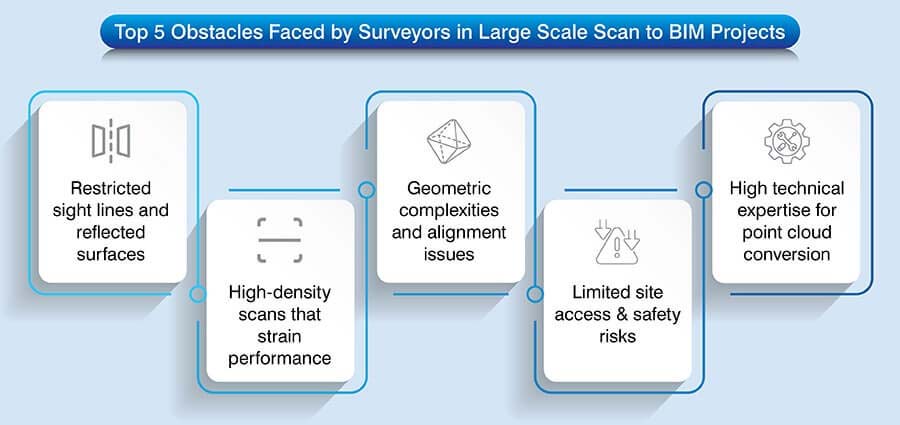
Point cloud to BIM transforms reality capture data into smart and data-rich 3D models. In point cloud to Revit modeling, points clouds are imported into Revit to develop precise geometry and building elements.
If you are part of a laser scanning firm, you would know that laser scanners and LiDAR create high-resolution point cloud data to capture accurate coordinates. Dense point cloud data supports accurate 3D modeling, validation and as-built documentation.
3D laser scanning documents real-world geometry by releasing laser pulses and then calculating their time of return. This yields accurate spatial coordinates called point clouds.
Surveyors and surveying companies achieve high accuracy, quick data capture and reduced site disruption using converting point cloud to BIM models.
Also, since safety on the site is essential, stakeholders can leverage point clouds for reliable as-built data for effective modeling and coordination.
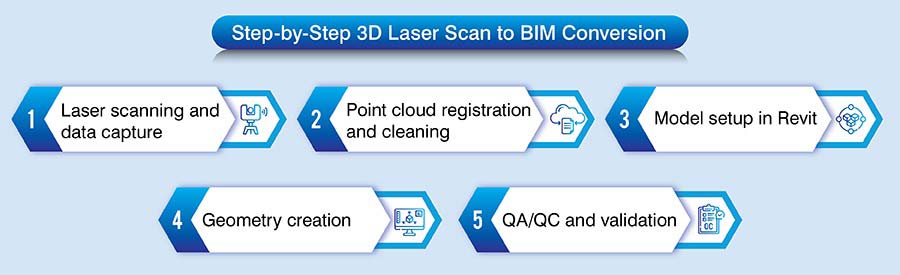
A Point Cloud to Revit workflow ensures optimal conversion of raw scanned point cloud data into reliable 3D BIM models. The required Level of Detail (LOD) depends on the project needs, ranging from LOD 200 for spatial coordination to LOD 400 for fabrication level Revit modeling.
As a surveyor, a BIM model not only reflects as built conditions but are detailed and accurate, reducing conflicts, rework and design risks for a retrofit or renovation project. Here is a step-by-step breakdown of the workflow.
Get precise as-built Revit models from high-resolution laser scans.
Start your project today »Converting Point Clouds to Revit models supports laser scanning firms to translate reality-capture data into precise and data-rich 3D Revit models. It injects value to laser scanning services through improved design coordination, renovation, and asset management.
Point cloud to BIM for a heritage monument ensures project completion within timelines
A laser scanning services provider from the UK partnered with Hitech CADD Services to create a Revit 3D BIM model for a 16th century heritage project. They provided inputs including 3D survey measurements and images.
The team of BIM experts at Hitech CADD Services navigated challenges including complex detailing, preservation of architectural features and conversion of large point cloud data.
They adopted Virtual Construction Modeling (VCM) for processing and documentation. A clash free 3D Revit model at LOD 400 was created using Revit families and parametric cross sections.
Original scan data was referenced to create shapes, sizes, extrusions, etc. The final as-built model was enriched with beams, columns, and joists along with the required levels.
After the deliverables were handed over to the client, it helped them:
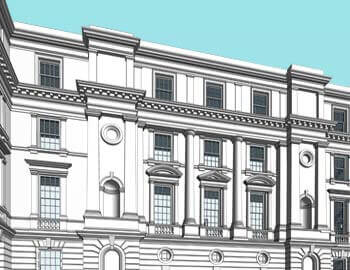 Scan to BIM Conversion
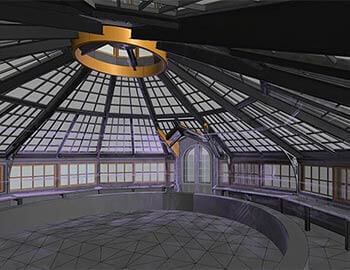 3D View
Transform laser scan data into intelligent BIM models that support better decisions.
Get Started »When best practices for scan to BIM are adopted, it can help your firm achieve data validity and consistency from the scanning phase to 3D modeling. If you use a regularized workflow, it ensures the deliverables align with the project scope.
Clear scope and LOD definition: If you define the scope and LOD, it fosters threshold accuracy, modeling intent, and prevents over or under-modeling.
Scan planning and control points: Correct scan planning ensures complete coverage, reduces occlusions and improves point cloud quality. Accurate control points and coordinate systems also facilitate accurate registration, alignment as well as model orientation.
Point cloud processing: Raw scan data needs to be cleaned and filtered to eliminate noise, redundancies, and outliers. The following 4-step process is often beneficial in cleaning raw scanned data.
Revit 3D modeling: Accurate interpretation of the point clouds helps you model floors, walls, ceilings and MEP equipment without clashes or any kind of data loss. Also, geometric complexities require tools like Revit to manage required accuracy and tolerances values.
Setting correct levels and grids: Precise spatial references can be incorporated by using levels and grids. It helps your 3D model align with actual as-built conditions.
Quality control and model audit checks: When a thorough quality control and audit check is set, it ensures your laser scan data to BIM model connects with point cloud data and tolerance levels. It also validates geometry and coordinates for a fully compliant as-built result.
Point Cloud to BIM helps laser scanning firm’s handover precise as-built models for renovation and retrofitting projects. These 3D models enforce design validation, structural assessments, conflict resolution, and optimized retrofit planning through greater accuracy and minimal site revisits.
Also, for facilities management and digital twins, point cloud to BIM is a robust tool to develop data-rich Revit models that mirror real-world assets. When adopted, it helps surveying companies with asset tracking, maintenance planning, and lifecycle enhancement by using continuously updated 3D models.
Point Cloud to BIM has become an unshakable foundation for precise as-built handovers. It helps surveyors and surveying firms achieve data-driven insights, reduce uncertainties, and optimize coordination.
Looking into the future, laser scans converted into point cloud data and integrated with Revit will continue to support complex renovations and asset intelligence. It will also facilitate the development of scalable digital twins to shape the future of smart building lifecycle management.
Our laser scanning–based Scan to Revit solutions deliver measurable accuracy for renovations and retrofits.
Contact us »
Jimmish Chudasama is a Project Lead at Hitech CADD Services with over 10 years of experience in BIM-driven modeling and drafting workflows. He specializes in Revit and AutoCAD projects, overseeing teams that deliver services such as PDF to CAD, Scan to CAD, and Scan to BIM conversions. His expertise in developing detailed Revit models from LOD 100 to LOD 400 has helped ensure accurate project documentation and seamless handovers across numerous construction projects.
You may also like
The Role of Millwork Detailing in Modern Architecture
 Feb 11th, 2026