As an architect, the shift from 2D CAD to 3D BIM model has become vital in today’s competitive market. 3D BIM modeling help architects understand architectural aspects including spaces, shapes and details that were difficult to visualize using legacy tools. Projects can be executed with fewer issues and design teams feel more confident about overall outcomes.
Table of Contents
Any architect with long years of experience would’ve relied on old ways of architectural drafting. The T-squares, triangles, projection equipment and line weights that made drafting possible. But BIM modeling for architects has helped leave those time consuming and manual methods behind.
Building Information Modeling(BIM) has given stakeholders the ability to rapidly create accurate and conflict free 3D models, which capture almost all aspects of a building design. Architectural BIM services obviously made connected processes and collaboration more efficient. But the real surge in BIM acceptance came when tools like Revit made complex 3D modeling fast and standardized. With this BIM added time and cost planning into the 3D model with 4D and 5D BIM. This opened up new capabilities and the ability to create near-perfect schedules. Connecting cost data to the 4D model gave accurate cost estimates that earlier took days to create with legacy tools.
BIM also brought Level of Development (LOD) to show detail, data and better coordination, so models at different LOD could be referred to at different stages of a project.
Just looking at hundreds of static lines within drawings can be confusing though architects have been working for long armed only with 2D drawings. But the speed and complexity of modern construction makes BIM the only reliable solution for planning and dimensioning. 2D drawings extracted from 3D models are a different story though, because every line and measurement is reliable. Visualizing shapes and clashes is so difficult with 2D drawings, but with 3D BIM it’s easy, and also the software can verify and validate each design element against codes and standards.
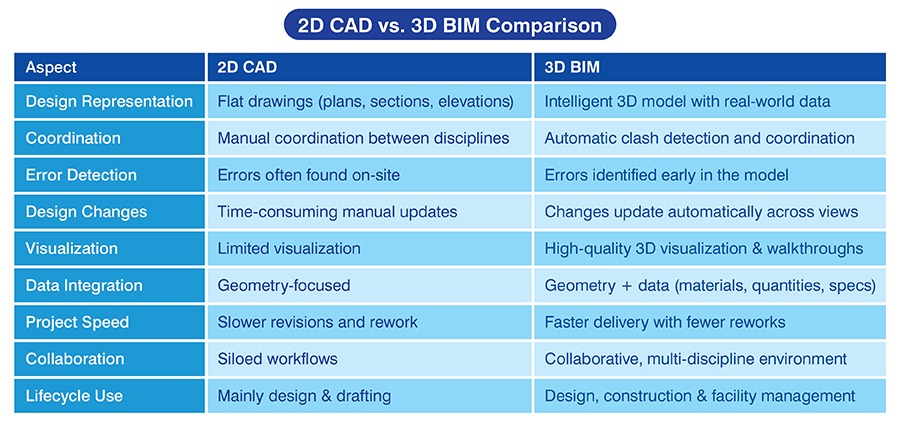
As an architect you can leverage numerous capabilities that BIM has to offer. Parametric modeling combined with Revit families and automation makes design work faster. Changes are updated faster while keeping all the elements synchronized. This reduces problems and saves time for various teams and projects.
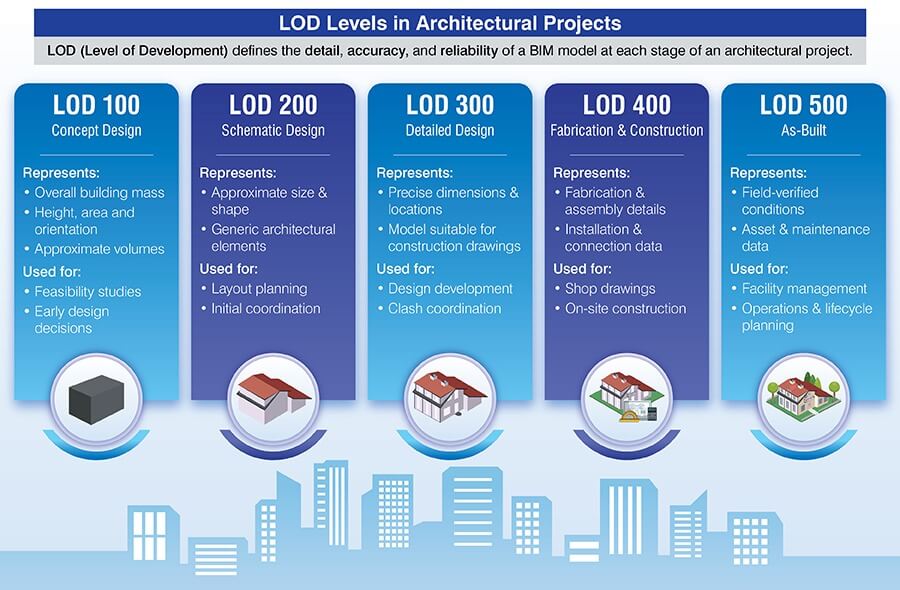
Levels of Development (LOD) in architectural BIM are a definitive roadmap to assess the growth of the 3D model. It begins as simple shapes and gains greater detail. At the end, every pipe, wall and beam designed as per LOD standards in BIM modeling tell a detailed story of what’s being built.
Choose the right LOD and model with confidence at every project stage.
Discuss your BIM requirements Now »Yes, LOD influences accuracy and detailing of 3D models. Higher the LOD, greater the precision and data included within the model. It helps with conflict identification and resolution, scheduling, cost estimation and manufacturing. It has a direct effect on design improvements and quality of construction.
Architectural BIM standards in the US and UK focus on collaboration and stability. It guarantees efficient data exchange, design coordination and seamless lifecycle management.
American Institute of Architects(AIA) is used in the United States, enabling best practices and contract frameworks to use BIM. It includes rules for ownership of 3D models, LOD specs and cooperative workflows. It makes sure consistency and efficiency at every project phase.
The UK framework is built on standards such as PAS 1192 and ISO 19650. It helps architects and projects align with international standards to manage information at every stage. Consistent information, interchangeable protocols and collaborative processes improve results and interoperability.
It’s a comprehensive framework for managing architectural projects in the United Kingdom. The RIBA Plan of Work 2020 lists 8 important levels, which include definition, collaboration and delivery. BIM workflows integrate with RIBA levels to refine project management and information flow.
Every stage connects with design development, feasibility studies, construction and operations. Adherence to best practices and industry processes is led by RIBA compliance. As an architect it can help you with clarity, risk reduction and swift communication.
Results based on a quantitative study shows the use of BIM reduces schedules by 20% and costs by 15%.
Source: springer.comThere are many benefits of BIM for architects and architectural firms. Let’s understand each in detail.
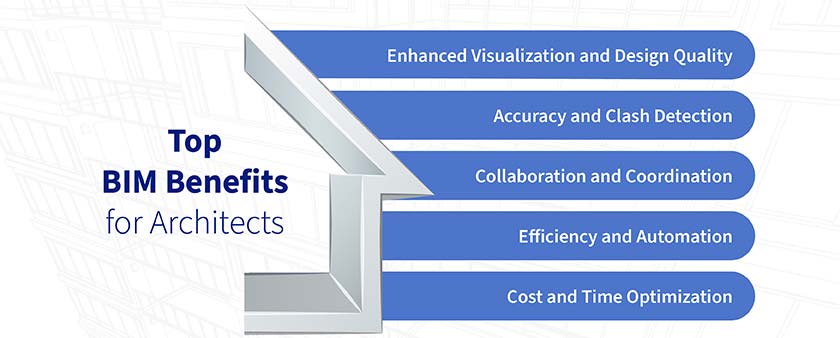
The ability to visualize elements in the 3D model with higher realism refines decision making. Architectural 3D visualization reduces errors and ensures high-quality results.
3D models to understand architectural design: Translating drawings into 3D models in Revit makes surea detailed understanding of dimensions and materials, along with spatial relationships. It leads to improved design understanding and decision making.
Achieve realism using walkthroughs and renders: 3D models are key to creating immersive experiences using renders and walkthroughs. This level of visualization can help you and clients in their collaboration and communication.
Clear the clutter caused by 2D drawings: 3D models are holistic in their approach to help clients with greater clarity using a singular source of truth. This eliminates problems in comparison to drawings for the entire lifecycle.
3D models that are clash free bring greater trust and confidence for clients. This methodology reduces frequent changes on the site.
Parametricism prevents errors: Using parametric 3D modeling along with prebuilt rules make sure greater consistency and error reduction, which lowers rework.
Identify conflicts between building trades: As an architect you can use BIM tools like Navisworks to identify and remove interferences between multiple disciplines.
BIM uses an integrated approach for architects and other participants to improve project efficiency. Aligning every team to work on the same 3D model creates seamless communication.
Use BIM to realize project wide collaboration: BIM used Integrated Project Delivery (IPD) and a Common Data Environment (CDE) like BIM 360 for teams to upload, share and edit files. As an architect you can use these tools to communicate with multiple people in realtime and solve issues. This makes sure better communication and coordination.
Remove disconnects with a shared 3D model: A singular 3D model helps multiple people use updated and precise data. This eliminates information silos and pushes faster decision making within design, construction and facilities management.
Automation cuts through manual tasks to improve productivity. This methodology refines schedules, lowers problems and improves resources, which leads to a better output.
Erase repetition and focus on real design: BIM uses databases and algorithms to automate timelines and material quantities. Shop drawings extracted from the 3D model are error free for fabricators to use. Dynamo automation lowers manual input and freezes errors to help you spend time on design strategies.
Quick model updates improve accuracy: Creating 3D models with parametric capabilities helps design teams speed up design prototypes through dynamic updates. Modifying even a single parameter creates model-wide changes in other elements. It makes sure model consistency and lowers the need for changes. As an architecture professional, you can leverage tools like Dynamo, visual scripts and Revit APIs.
If you’re looking at reducing expenses and making schedules seamless without lowering quality, BIM is the required tool.
Produce quick design alternatives: Converting 2D drawings to 3D models helps architecture firms with design enhancement and optimized performance. Evaluating energy use, cost effects and structural presence with simulation tools helps architects and clients save costs at every stage.
Cut frequent changes with interference detection: Advanced tools like Navisworks can solve interference issues in a blink of an eye. Conflicts between systems from various trades is 1 of the reasons projects never finish within timelines and costs. This is completely removed from the equation for swift project delivery.
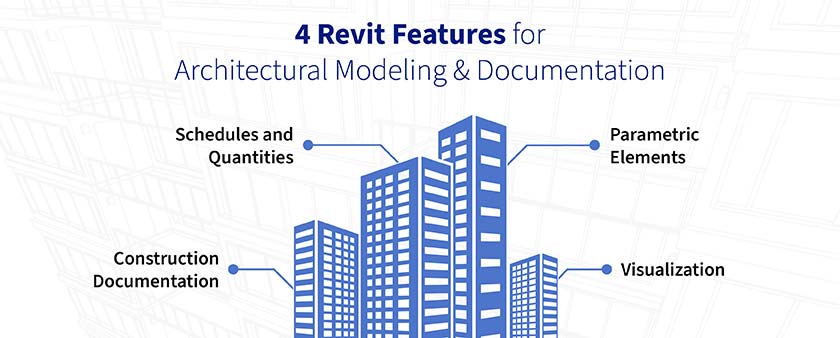
Revit is a prominent tool we see used across the BIM fraternity. Its ability to quickly create 3D models from 2D drawings can help you build precise and smart 3D models. Using parametric features in Revit, accompanied by a large toolset helps architects refine processes for a greater impact during handovers.
Speed up client approvals with immersive walkthroughs.
Call our experts »BIM helps large projects achieve exceptional results during handover and execution. The story, however, is not the same for small to midsize firms.
Using BIM in design and construction projects decreases design issues by 30% and RFI count by 25%.
Source: springer.com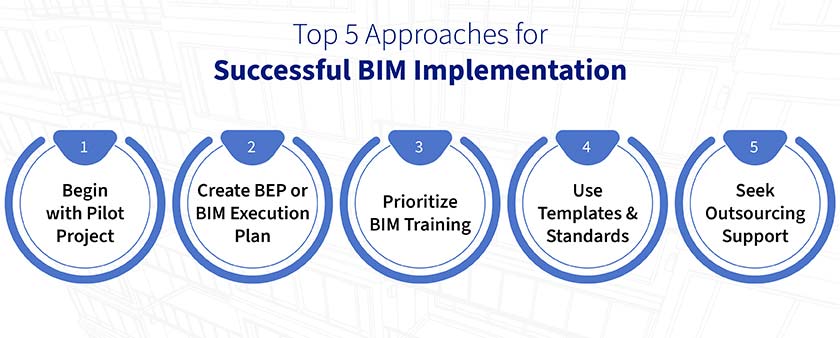
Including BIM in projects has improved architectural practices, supported by better workflows and collaboration. The stories mentioned here hint at better BIM coordination, cost estimation, and project delivery for ROI and client satisfaction.
Approval drawings aligned with local standards saves costs for 500+ residential units
An architectural firm from the USA partnered with Hitech CADD Services for a project that included residential units. 2D drawings in .dwg format were provided by the client to our team. We had to overcome various obstacles, including numerous sketches and drawings, unclear junction detailing and condensed schedules.
We raised multiple RFIs to solve issues within the design. A comprehensive set of approval drawings was created taking into consideration layering, line weight, format and scale. Converting 2D to 3D helped our client win quick city approvals for various residential units.
The deliverables provided to the client led to:
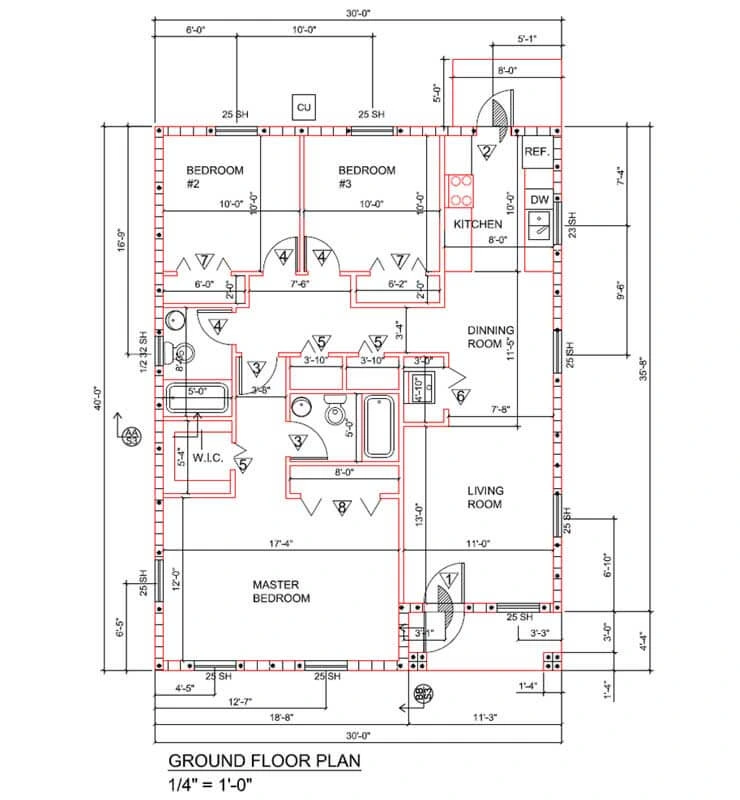 Ground Floor Plan Details
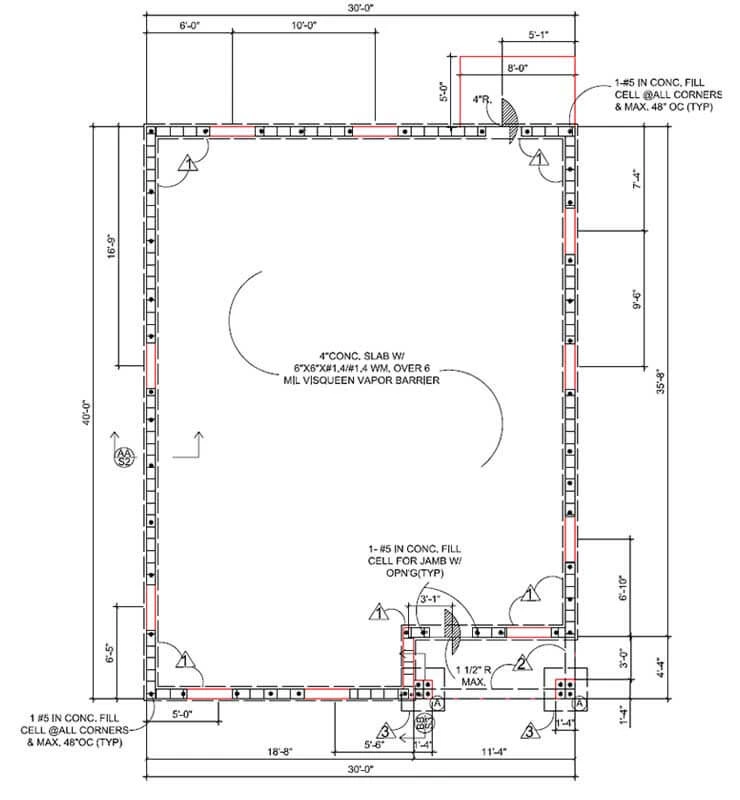 Foundation Plan Drawing
Material and cost savings for a residential project with an architectural model
An architecture consultant from the UAE joined hands with us for a 4-storey residential project. We were provided with CAD drawings, reference sketches and PDF files. After assessing the input, we were successful in converting the 2D files into clash-free Revit models at LOD 300.
AIA standards were incorporated and inconsistencies removed. The model was enriched with symbols and annotations. We used BIM 360 as a platform to store and share the 3D model with clients. As the 3D model was accurate and conflict free, we extracted GA drawings with elevations, sections, etc.
Upon handover of the deliverables, the client was able to realize:
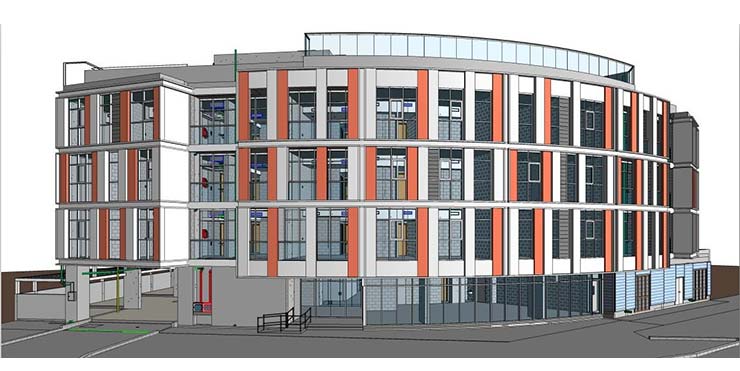 LOD 300 Architecture Model
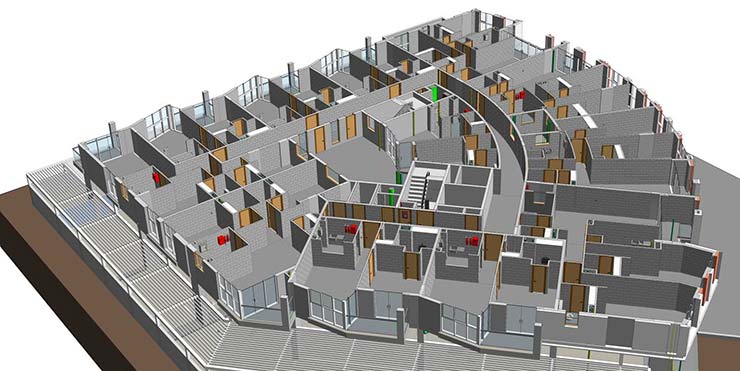 Building Internal Image
As AI becomes more firmly integrated with BIM, it’ll help architects automate more tasks and enhance design performance. It’ll also be used to analyze designs for faster prototyping and to enhance design creativity in architecture.
Decision making will become more methodical as artificial intelligence helps to analyze and break down task complexities. You can quickly create alternative prototypes of any design with AI based generative design, and test out parameters, constraints and solutions. As both AI models and their use mature, BIM will see its capabilities enhanced. AI will help to assess extensive datasets, calculating building performance and highlighting clashes and help us use BIM for more sustainable designs.
The move from 2D drafting to 3D, and modern BIM, has helped architects and engineers to speed up workflows and increase accuracy. The chances of missing design changes have drastically reduced as the 3D models are parametrically updated in realtime. For anyone who understands how parts fit and work together, it’s now easier to identify errors and avoid project catastrophes. With BIM helping align teams and projects from start to finish, risks have reduced in onsite work, and project coordination has taken a leap forward.
But the shift from a 2D-first to a 3D-first approach doesn’t discard 2D altogether. What BIM has made possible is avoiding manual 2D drafting by leveraging 3D models and automation, and extracting highly accurate 2D drawings and plans from the 3D model, which is updated both parametrically and in real time.

Harika Singh is an academician and published writer. Her passion for engineering and technology reflects in the in-depth coverage she provides on technology trends. 20 years of work association with institutes of repute across India and the US positions her to provide valuable insights to business stakeholders on achieving scalability and operational efficiencies through digitalization.
You may also like
Point Cloud to Revit: The Backbone of Scan to BIM Projects
 Mar 17th, 2026
The Role of Millwork Detailing in Modern Architecture
Feb 11th, 2026